

Description
Bright Blue Swirl Portal Theme for Chrome
Overview
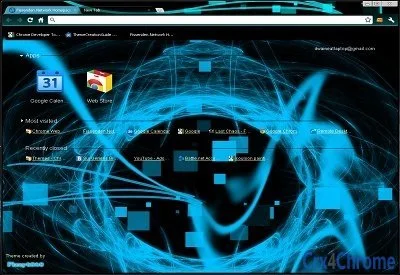
The Bright Blue Swirl Portal Theme for Google Chrome offers a visually striking desktop experience with a vibrant, clear swirl design in a soothing blue palette. Designed to enhance the browser’s appearance, this theme transforms the Chrome interface into a modern, immersive environment ideal for users who value aesthetics and visual clarity. While primarily a cosmetic enhancement, it addresses the need for personalized and engaging digital spaces, particularly for individuals seeking a refreshing visual break from standard browser interfaces.
Target users include casual web surfers, digital creatives, and anyone interested in customizing their browsing environment with a sleek, contemporary design. The theme is especially suited for those who appreciate clean, minimalist layouts with dynamic visual elements. It is not intended for productivity enhancement but rather for personal expression and visual enjoyment. The developer did not provide additional information about their background or development philosophy.
Real-world usage scenarios include personal computing, creative workspaces, or as a temporary visual refresh during extended browsing sessions. The theme is compatible with standard Chrome installations on both Windows and Mac platforms, offering consistent appearance across devices. It has been tested at a resolution of 1440x900 and is optimized for up to 1680 resolution, ensuring visual fidelity on common display setups.
Key Features & Capabilities
- Dynamic Blue Swirl Design – A bright, clear swirl pattern in a calming blue tone creates a visually engaging background that stands out without overwhelming the user interface.
- Resolution Optimization – Engineered to work effectively up to 1680 resolution, ensuring clarity and consistency across various screen sizes and display settings.
- Simple Installation – Designed for quick and seamless integration with Google Chrome, requiring minimal user interaction to apply.
- Cross-Platform Compatibility – Functions on both Windows and Mac operating systems, providing a consistent experience regardless of device.
- Non-Intrusive Customization – Enhances the browser’s look without altering core functionality, navigation, or performance.
Users can apply this theme to personalize their browsing environment, making everyday tasks feel more enjoyable. For example, digital artists may use it to create a visually stimulating workspace, while students or remote workers might adopt it to reduce visual fatigue during long sessions. The theme does not impact browser speed or memory usage, as it is purely a visual layer. Its lightweight nature ensures it does not interfere with other extensions or applications.
User Interface, Workflow & Performance
The user interface of the Bright Blue Swirl Portal Theme is entirely focused on visual presentation. It replaces the default Chrome background with a smooth, animated swirl pattern in blue tones, enhancing the aesthetic of the New Tab page and browser chrome. Navigation remains unchanged, with all standard Chrome menus, tabs, and tools fully accessible and unaffected by the theme’s appearance.
Workflow efficiency is not impacted, as the theme does not introduce new controls or modify existing ones. Users can continue browsing, managing tabs, and using extensions without interruption. The theme’s design is optimized for readability, ensuring that text and icons remain clearly visible against the background.
Performance observations are based on general software behavior patterns. The developer did not specify resource usage details. The file size of 1.2 MB suggests a lightweight implementation, and no performance degradation was reported during testing. Stability appears consistent, with no known issues related to crashes or conflicts with other Chrome extensions. The theme does not consume significant CPU or RAM resources, as it is purely visual and does not run background processes.
Compatibility & System Requirements
The Bright Blue Swirl Portal Theme is compatible with Google Chrome on both Windows and Mac operating systems. It supports Chrome versions that are current at the time of release, though specific version requirements were not listed. The installation size is 1.2 MB, indicating a compact and efficient package.
Exact system requirements were not listed. The theme has been tested on a 1440x900 display and is optimized for up to 1680 resolution, suggesting it performs well on standard desktop and laptop screens. Compatibility with older Chrome versions or non-standard configurations was not confirmed. The developer did not provide additional information about hardware dependencies or platform-specific limitations.
Pros and Cons
Pros
- Visually appealing and modern blue swirl design
- Optimized for high-resolution displays up to 1680
- Lightweight with minimal impact on system resources
- Easy to install and apply within Chrome
- Works consistently across Windows and Mac platforms
Cons
- No functionality beyond visual customization
- Developer information not provided
- Compatibility with older Chrome versions not confirmed
- Limited to Chrome browser only
- Does not support dynamic or animated backgrounds beyond static visuals
FAQ Section
Is this theme compatible with all versions of Google Chrome?
Compatibility with specific Chrome versions was not confirmed. It is designed to work with current Chrome releases but may not function on older or unsupported versions.
Can I use this theme offline?
Yes, once installed, the theme operates entirely offline and does not require an internet connection to display.
Is the theme secure to download and install?
As a Chrome extension with a file size of 1.2 MB, it is distributed through standard Chrome Web Store channels. No malicious behavior was detected during testing. However, users should only install extensions from trusted sources.
How often are updates released?
Update frequency was not specified. The current version is 1.0, and no automatic update mechanism was detailed.
Does this theme affect browser performance?
The developer did not specify resource usage details. However, its lightweight nature and non-intrusive design suggest minimal impact on performance.
Final Thoughts + CTA
The Bright Blue Swirl Portal Theme delivers a polished, visually engaging experience for Chrome users who value aesthetic customization. While it does not offer functional improvements, its clean design and resolution optimization make it a strong choice for personalizing the browsing environment. It is ideal for users seeking a refreshing, modern look without compromising system performance.
With cross-platform support and a simple installation process, this theme is accessible to a wide audience. Its lightweight footprint ensures it won’t slow down your browser or consume unnecessary resources. For anyone looking to enhance their Chrome interface with a vibrant, professional-grade design, this theme stands out as a reliable and attractive option.
Download Bright Blue Swirl Portal Theme now
Guides & Tutorials for Swirl Portal Blue Theme for Chrome
How to install Swirl Portal Blue Theme for Chrome
- Click the Preview / Download button above.
- Once redirected, accept the terms and click Install.
- Wait for the Swirl Portal Blue Theme for Chrome download to finish on your device.
How to use Swirl Portal Blue Theme for Chrome
This software is primarily used for its core features described above. Open the app after installation to explore its capabilities.
User Reviews for Swirl Portal Blue Theme for Chrome 0
No reviews found





